
_edited.png)

Stop Missing Vows: 5 Ceremony Sound Setup Essentials for Couples


A reliable ceremony sound setup comes down to five things: a lavalier or headset mic on the officiant, a wireless handheld backup for readings and vows, a powered speaker pair aimed at your guests, a backup recorder running as a safety net, and spare batteries for everything. Do a full sound check before guests arrive, and put one person in charge of watching mic status. That’s it. Everything else is detail work.
TL;DR:
A single well-placed lavalier mic and a small powered speaker are sufficient for small indoor ceremonies with up to about 40 guests.
Larger or outdoor gatherings require multiple speakers, wind protection, and battery power backups to ensure sound clarity and reliability.
Conducting a thorough sound check with real voices 15 minutes before the event prevents most common issues, with one person monitoring mic status throughout.
Wireless gear demands fresh batteries, proper frequency scans, and clear line-of-sight to avoid signal dropouts during the ceremony.
Terriffics Entertainment offers professional setup and backup services on Oahu, handling all gear, troubleshooting, and coordination for smooth ceremony sound.
Table of Contents
What Do You Actually Need for Ceremony Sound Setup?
Before you call a rental company or start Googling gear, get the checklist straight. Every ceremony, no matter the size, needs the same core building blocks. What changes is quantity and complexity.
Microphone(s): At minimum, one lavalier or headset mic for the officiant. Add a wireless handheld for readers, vow exchanges, or a musician.
Speaker(s): A single powered speaker works for small, tight indoor spaces. Wide aisles or larger guest counts usually need a pair.
Mixer or simple playback device: Something to blend mic input with processional and recessional music, even if it’s just a small mixer or a phone plugged into an interface.
Stands: Speaker stands raise sound above heads, which matters more than most people realize.
Windscreens: Foam or furry covers cut wind noise outdoors, according to guidance from Shutter & Sound.
Recorder or phone backup: A phone on voice memo near the altar, running the entire time.
Cables, adapters, spare batteries: More on these below, but never travel without extras.
If you’re renting from a vendor or working with a venue’s in-house system, tell them exactly how many mic inputs you need and whether your videographer wants a direct line-out feed. That single detail avoids a scramble on the day.
Pro Tip: Ask your rental company whether their speakers include a battery option. A dead outlet at an outdoor venue has ruined more than one ceremony’s audio.
How Do You Map Ceremony Space for Speaker Placement?
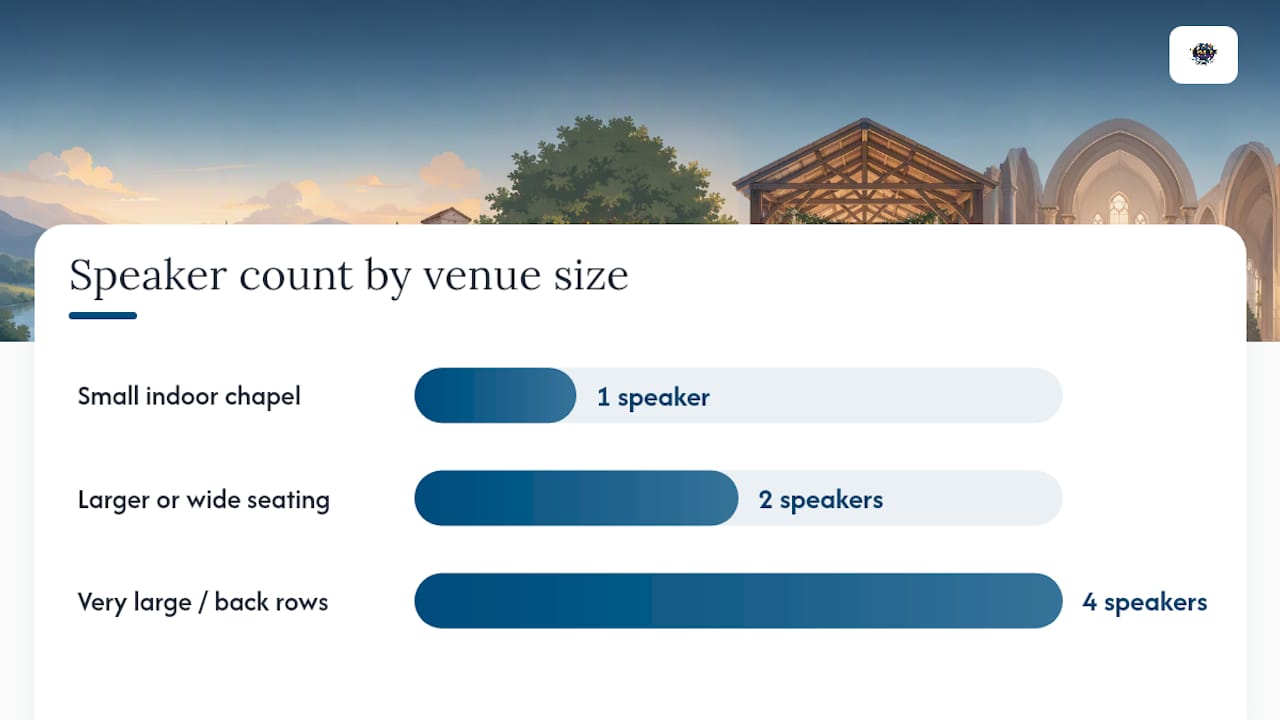
Start with a rough sketch: where guests sit, where the officiant stands, and how far the back row sits from the front. Distance is the number that drives every other decision. A small indoor chapel with a modest number of guests rarely needs more than one compact powered speaker and a single lavalier, according to ElectrifiedDJ’s breakdown of ceremony audio setups. For larger guest counts or widely spread seating, you will likely need a pair of speakers, sometimes with a delayed second pair for the back rows.
A few placement rules hold up across almost every venue:
Aim speakers at your guests, not at the microphones. Sound bouncing back into a mic is what causes feedback squeal.
Keep speakers physically behind the mic positions, not beside or in front of them.
For wide or split aisles, use two smaller speakers spread across the space rather than one loud speaker straining to cover it all.
Indoors, watch for hard walls and high ceilings that create echo. More volume won’t fix a room that’s already too reflective.
Before guests arrive, walk the full seating area while someone talks into the mic at normal ceremony volume. If you can understand every word from the back row without straining, coverage is solid.
Which Ceremony Microphone Type Fits Your Wedding?
Officiants and couples usually choose from four mic styles, and each one has a real tradeoff.
Lavalier mics clip onto clothing and stay nearly invisible, which is why they’re the standard for officiants who read from notes and don’t move much. Headset mics cost a bit more visibility but deliver more consistent pickup if the officiant walks, gestures a lot, or the ceremony is outdoors where wind and distance work against a lav, per Sortra’s mic comparison. Handheld mics work well for readers and shared vow exchanges, since they can be passed hand to hand. Podium or lectern mics suit ceremonies with a fixed speaking position, like a church altar with a built-in sound system.
Placement matters more than the mic itself. Clip lavs high on the chest, about a hand’s width below the chin, outside clothing, and away from jewelry that can tap the capsule, a detail confirmed in Shutter & Sound’s ceremony audio guide.
Before guests take their seats, run this check:
Confirm the officiant mic is clipped correctly and switched on.
Test the backup handheld for readers or vow exchange.
Have someone speak at normal volume from every mic position.
Start the phone recorder near the altar and confirm it’s actually recording.
Pro Tip: Two mics beat one, even for a small ceremony. A second mic on standby is what saves the vows when the primary one fails.
Building a Simple, Reliable Signal Chain
Keep the signal path short: mic into a wireless receiver or direct input, into a small mixer, out to your powered speakers, with an optional feed splitting off to your videographer’s camera. Fewer connections mean fewer failure points, a principle backed by Sortra’s planning guide for ceremony sound systems.
Bring at least one extension cord and a surge protector for outdoor outlets.
For remote sites with no power, rent battery-powered speakers rated for several hours of use.
Tape cable runs flat to the ground and route them away from walking paths.
Label each cable end so troubleshooting doesn’t turn into guesswork mid-ceremony.
If sound cuts out, check the simplest thing first: power connection, then mixer input level, then the mic itself.
Wireless Reliability: Batteries, Frequency, and Antenna Placement
Wireless gear is only as good as the discipline behind it. Fresh batteries in every transmitter and receiver, checked the morning of the ceremony, prevent the most common failure.
Scan for open frequencies before the event, especially at venues hosting multiple weddings that weekend.
Keep line-of-sight between transmitter and receiver whenever possible; walls and bodies block signal.
Mount receiver antennas upright and away from metal fixtures that cause interference.
If a wireless channel drops, switch to the wired handheld backup immediately and let the phone recorder keep running.
Wireless convenience only pays off when someone treats it as a discipline, not a set-it-and-forget-it gadget.
Outdoor Ceremony Sound: Wind, Power, and Weather
Outdoor ceremonies add three problems indoor venues don’t have: wind, unpredictable power, and open-air sound loss.
Use foam or furry windscreens on every lav and handheld, and tuck lavs slightly behind a lapel edge to cut direct wind hits.
Bring battery-powered speakers as a backup even if you’ve secured an outlet, and cover mixers and receivers with a simple rain shield.
Spread speaker coverage rather than relying on one loud source. Open air swallows sound faster than a room does.
Test the full system at the actual ceremony start time, not an hour earlier, since wind and crowd noise change through the day.
Pro Tip: If the forecast looks shaky, have a tented or indoor backup location scouted, and know exactly how fast your sound gear can be relocated.
Day-of Sound Check and Backup Plan Checklist
Run this sequence starting 30 minutes before guests are seated:
Power up every speaker, mixer, and receiver.
Check each mic input individually at speaking volume.
Test the wireless handheld and confirm the officiant mic is live.
Play a few seconds of processional and recessional music to confirm playback levels.
Walk the guest seating area to catch any dead spots.
Start the backup phone recorder and verify it’s capturing sound.
Confirm spare batteries, a backup mic, and a second playback device are staged and ready.
Assign one person, not the officiant and not the couple, to watch mic status during the ceremony itself. This single role prevents most of the “I didn’t know it was off” disasters, a habit echoed in field guidance from Shutter & Sound.
Coordinating Sound With Your Officiant, Videographer, and DJ
Confirm a few specifics with each vendor well before the wedding day. Ask the officiant whether they prefer a lav or headset, since comfort affects how well they wear it. Ask the videographer if they need a direct line-out feed or a camera-mount wireless receiver, a common setup covered in Audio-Technica’s guidance on ceremony audio. Confirm with your DJ or planner who holds final authority over music cues, and if you’ve hired live musicians, coordinate their DI or mic needs directly with them ahead of time.
Request access to power outlets and cable routing paths early.
Send a short message to every vendor a week out: mic type, cue timing, and who to contact day-of for last-minute changes.
Real Ceremony Sound Setups From the Field
A backyard ceremony for 40 guests needs one lav on the officiant and one small powered speaker. A 150-guest outdoor lawn wedding calls for a lav, a wireless handheld, and a distributed speaker pair. A beachfront ceremony with no power access runs on battery-powered speakers, windscreened lavs, and two phone recorders as backup. A thorough fifteen-minute mic check before guests arrive is the one habit that prevents the most problems in ceremony sound setups.
Why the “More Gear Is Better” Advice Gets Ceremony Sound Wrong
Most guides push couples toward buying or renting more equipment than a ceremony actually needs. That advice sells gear, but it doesn’t fix sound. A ceremony for 40 guests in a quiet chapel does not need a concert-grade speaker stack. It needs one well-placed lav mic and a single small speaker aimed correctly.
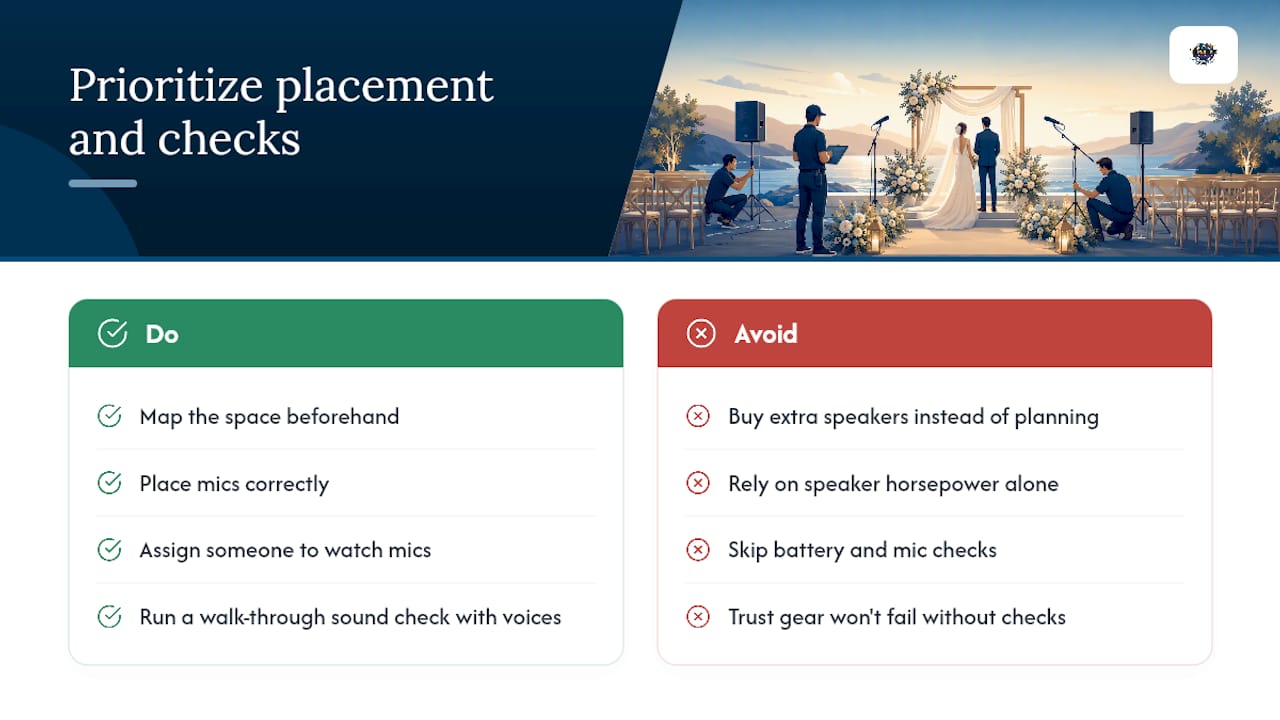
The overlooked truth in ceremony audio is that placement and discipline beat horsepower almost every time. A $2,000 speaker aimed at the wrong angle, or a lav clipped under a jacket collar, will sound worse than a modest setup positioned correctly and checked fifteen minutes ahead. Wireless reliability is the same story: the gear rarely fails on its own. Dead batteries and skipped sound checks fail it.
If you take one thing from this guide, prioritize the walk-through test over the shopping list. Map your space, place your mics correctly, assign someone to watch mic status, and run a real sound check with real voices before a single guest sits down. Everything else, extra speakers, backup mixers, fancier mic brands, is a nice-to-have layered on top of that foundation, not a substitute for it.
— Terriffics
Let Terriffics Handle Your Ceremony Sound Setup
Reading a checklist is one thing. Standing at your venue an hour before guests arrive, hoping the wireless channel doesn’t drop during your vows, is another. Terriffics Entertainment builds and runs ceremony sound setups across Oahu, so you get a tested mic, speaker, and backup plan without tracking down rental gear or troubleshooting cables yourself.
Event entertainment packages often include fast setup and teardown, along with flexibility to mix and match sound with lighting, photo booth, or karaoke for your reception. Whether you need a simple lav-and-speaker setup for an intimate backyard ceremony or full coverage for a large outdoor venue, the services page lays out every package option, from the Basic DJ Package up through Premium. Check availability for your date and get a quote before your calendar fills up.
Sources
FAQ
What Is the 30-5 Rule for Weddings?
There’s no single agreed-upon “30-5 rule” for wedding sound in the sources covering ceremony audio. If you’ve heard the term used for planning timelines or seating counts, treat it as a personal rule of thumb rather than an industry standard, and lean on a real sound check instead.
How Do I Set Up a Sound System for a Ceremony Venue Like a Church?
Confirm whether the venue has a house sound system you can feed into, then add your own lav or headset mic for the officiant and a wireless handheld for readers. Run a full sound check with real voices at least 15 minutes before guests arrive to catch echo or coverage gaps common in large rooms.
What Sound System Is Best for Small Ceremonies?
For a small indoor ceremony, a single compact powered speaker paired with one lavalier mic on the officiant is often enough, since tight spaces and helpful acoustics do some of the work for you. Adding more power to compensate for poor placement usually makes clarity worse, not better.
What Is the Traditional Order of Speakers at a Wedding Reception?
Reception speaking order typically follows a customary sequence: the DJ or emcee opens, followed by the best man, then the maid of honor, then parents, before the couple speaks if they choose to. Confirming this order with your DJ or planner ahead of time keeps cue timing smooth once the microphone changes hands.
Can Terriffics Entertainment Handle My Ceremony Sound Setup on Oahu?
Yes. Terriffics Entertainment provides rental and full setup for ceremony sound, including mics, speakers, and backup gear, as part of its DJ sound and lighting packages. Current pricing for each package is listed on the services page.
Recommended
This article was created with the assistance of AI and reviewed for relevance and accuracy by Terriffics Entertainment. Information may change over time, so readers should verify important details with the appropriate local source.
Comments