
_edited.png)

Start Two Weeks Early: Graduation Slideshow Ideas That Play Flawlessly

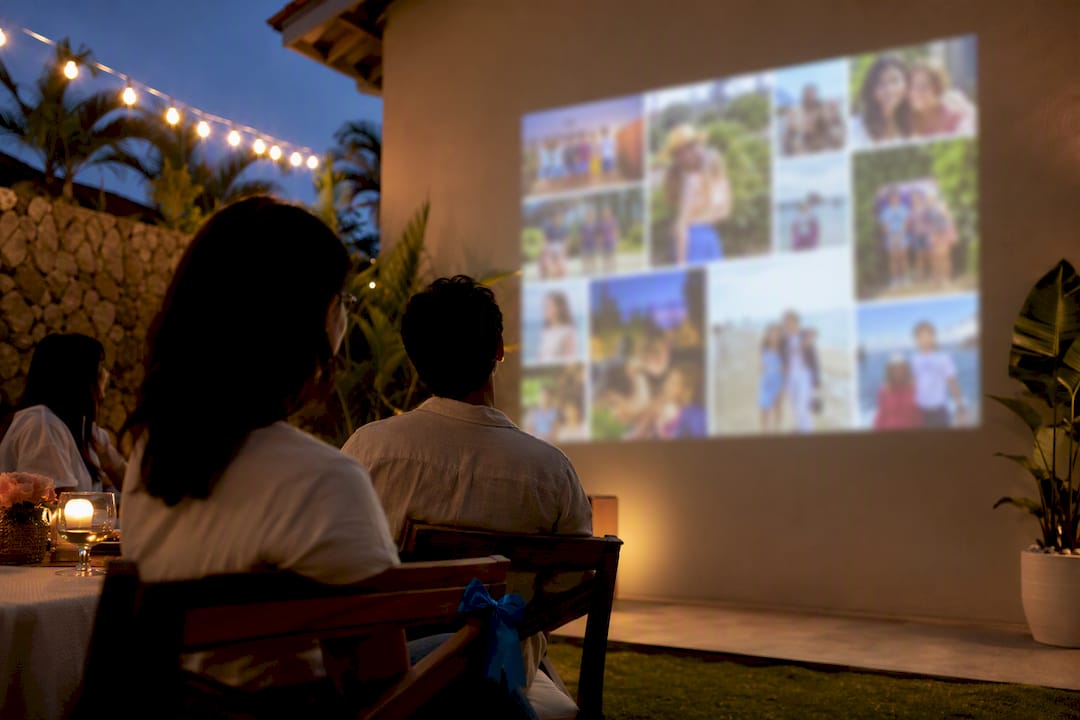
The best graduation slideshow is a chronological highlight reel, typically lasting a few minutes with a moderate number of well-chosen photos, set to one or two songs that actually mean something to your graduate. Start by gathering photos early, pick your song before you touch any editing software, and test playback on the actual screen or TV you’ll use at the party. Everything else in this guide builds on that foundation.
TL;DR:
Ensure your photos and videos are collected early, using JPEGs and MP4s, and prioritize variety over sheer volume during selection.
Decide on an arc that highlights early childhood, school years, and the graduation day itself, with 3 to 5 seconds per photo for smooth pacing.
Test the slideshow on the actual display device and set the timing, captions, and music to match the room’s environment and audience preferences.
Use high-contrast captions, large fonts, and simple styles to improve readability, especially for distant viewers or attendees with visual impairments.
Consider hiring a professional service to handle creation, equipment, and playback to ensure flawless execution during the event.
Table of Contents
Graduation Slideshow Ideas Worth Stealing
Chronological is the default for good reason: it gives every viewer, from grandparents to classmates, a story they can follow without narration. Start with baby photos, move through elementary school chaos, middle school awkwardness, and land on senior year. One photo per year of school works well for a clean, easy-to-plan structure that doesn’t require sorting through thousands of images.
But chronological isn’t the only creative graduation slideshow format worth considering. A few others deliver more emotional punch depending on the graduate’s personality and your available photos:
Friends and family tribute groups photos by relationship rather than time, so each section spotlights a different circle of people who shaped the graduate’s life.
Milestone montage skips the day-to-day and jumps straight to big moments: first day of school, championship games, prom, acceptance letters.
Then and now pairs a childhood photo with a recent one, side by side, for a quick gasp-and-laugh reaction from the crowd.
Hobby or major spotlight works well for graduates with a clear passion, think dance recitals, robotics competitions, or theater productions, cut together as its own chapter.
Humor and outtakes reel as a short bonus segment (30 to 45 seconds) after the main slideshow gives everyone a laugh before dessert.
Mixing in a few short video clips, ten seconds here, fifteen there, breaks up the still-photo rhythm and adds a layer that photos alone can’t deliver. A clip of a graduate’s actual laugh does more emotional work than five posed portraits combined.
Design details matter more than people expect. Use the school’s colors in your title cards and captions instead of generic templates. Keep captions to a few words: a name, a year, an inside joke, not full sentences that compete with the photo for attention. And alternate candid and posed shots deliberately. Three posed portraits in a row feels like a yearbook. Mixing in a blurry candid of someone mid-laugh makes it feel like a memory.

How To Make A Graduation Slideshow Step By Step
Building a graduation slideshow follows a predictable sequence, and skipping steps is exactly what leads to last-minute panic the night before the party.
Collect photos and videos early. Text family and close friends and ask for their best shots. Start at least two weeks before the event so stragglers have time to respond. Ask for original files rather than screenshots. JPEGs and MP4 clips are the easiest formats to work with.
Cull ruthlessly. You’ll likely end up with many photos. Narrow those down to a moderate number, prioritizing variety of people, places, and ages over sheer volume.
Choose your arc. Decide on a beginning (early childhood), a build (school years and activities), and a finale (senior year, graduation day itself).
Set your timing. Give each photo 3 to 5 seconds with 1 to 2 second transitions between them, and slot video clips in as short breaks in the rhythm rather than back to back.
Add titles and captions, then check that the text is actually readable at the size your final screen will display.
Export and back up. Save as an MP4 using H.264 compression, and keep a copy on a USB drive as well as in a cloud folder.
Total runtime should be moderate to keep audience attention, as longer slideshows can lose viewers even among close family.
Pro Tip: Export a test version and watch it start to finish on the same device or screen you’ll use at the party, not just your laptop. Fonts that look crisp on a 13 inch screen can turn into a blurry mess on a projector.
Which Slideshow Tools Fit Your Skill Level?
Your tool choice should match how much time you actually have, not how impressive you want the final product to look.
If you’re short on time, phone apps and automatic slideshow makers do the heavy lifting for you: upload photos, pick a song, and the app handles pacing and transitions on its own. These work well when you need something finished the same day.
For a middle ground, web-based design tools and template libraries let you build a custom look without a steep learning curve. Canva’s graduation templates make it easy to match school colors and add captions with drag-and-drop editing, though a template can feel generic unless you personalize the colors, fonts, and pacing yourself.
If you want full control over pacing, motion effects, and audio mixing, a desktop editor like Adobe Premiere Elements gives you that flexibility at the cost of a real time investment.
When comparing options, weigh these factors:
Ease of use versus how much creative control you actually need
Whether family members can contribute photos collaboratively
Export format compatibility with your playback device
Music licensing, since some platforms restrict copyrighted songs
Template variety if you’re leaning on a design tool rather than building from scratch
Free templates cover most needs. A paid template or a professional service makes more sense when you’re short on time or want guaranteed results on the big day.
An Event Pro’s Playback Checklist For Graduation Parties
Making the slideshow is half the job. Getting it to play flawlessly at a crowded party is the other half, and it’s where most DIY slideshows fall apart.
Decide upfront whether you’re premiering the slideshow at a specific moment (right after speeches, for example) or looping it as background ambiance during dinner. Both work, but they call for different files: a premiere version needs full sound, while a looping version often plays better muted or with a quiet ambient track so it doesn’t compete with conversation.
Before the event, run through this checklist:
Bring the slideshow on a USB drive and have a cloud backup link ready in case the drive fails.
Pack HDMI cables and adapters for whatever screen or TV you’re using. Dongles have a way of disappearing right when you need them.
Check audio levels against room noise, not against how it sounded on your headphones at home.
Confirm caption text is large enough to read from the back row, and match your slideshow’s aspect ratio to the screen so nothing gets cropped or letterboxed unexpectedly.
Terriffics Entertainment has run into every version of this problem while staging graduation parties across Oahu, and our guide to entertaining graduation guests walks through real setups from past events.
Picking Graduation Slideshow Music That Doesn’t Backfire
Music makes or breaks the emotional impact of a slideshow, and it’s the step people rush through most often. A personalized song choice, or an instrumental version of a meaningful track, tends to land harder than a generic “graduation anthem” that’s been used in a thousand other slideshows.
Check the lyrics before you commit. A song that sounds upbeat on the radio can carry lines about breakups, partying, or language that feels out of place with grandma in the front row. If the graduate has a song tied to a specific memory, a road trip, a team win, that beats almost anything you’d pick from a “best graduation songs” list.
Pacing matters just as much as song choice. A four-minute song forces you to either stretch your slideshow uncomfortably long or cut the music short mid-chorus, which feels abrupt. Match your photo count and timing to the song’s actual runtime, not the other way around. If you’re using two songs, plan the transition between them to land during a natural pause in the photos, not mid-scene.
One or two songs is usually enough. A slideshow with five different tracks starts to feel like a highlight reel from five different events instead of one coherent story.
Making The Slideshow Land With Every Type Of Guest
A graduation party pulls together people who knew the graduate in completely different ways, and a slideshow that only speaks to one group loses the room fast.
Family members, especially grandparents and older relatives, respond most to early childhood photos and long-term growth, baby pictures next to a cap-and-gown shot hits hard for them. Give your chronological or then-and-now sections real weight for this crowd.
Peers and classmates care more about recent years: prom, sports, inside jokes, and the humor reel. If you skip straight from elementary school to graduation day, you’ll lose your graduate’s actual friend group in the middle stretch.
Teachers and mentors, if they’re attending, appreciate seeing academic or extracurricular moments they were part of, a robotics competition, a school play, a debate tournament. A quick nod to these moments, even just a few seconds, makes them feel included rather than like background guests.
The fix isn’t separate slideshows for each group. It’s building your arc so each type of guest gets at least one segment that speaks directly to them, spread across the full runtime rather than clustered at the start or end.
Accessibility Details That Make A Real Difference
A slideshow that looks great on your laptop can be unreadable to a chunk of your actual audience, and small fixes solve most of the problem.
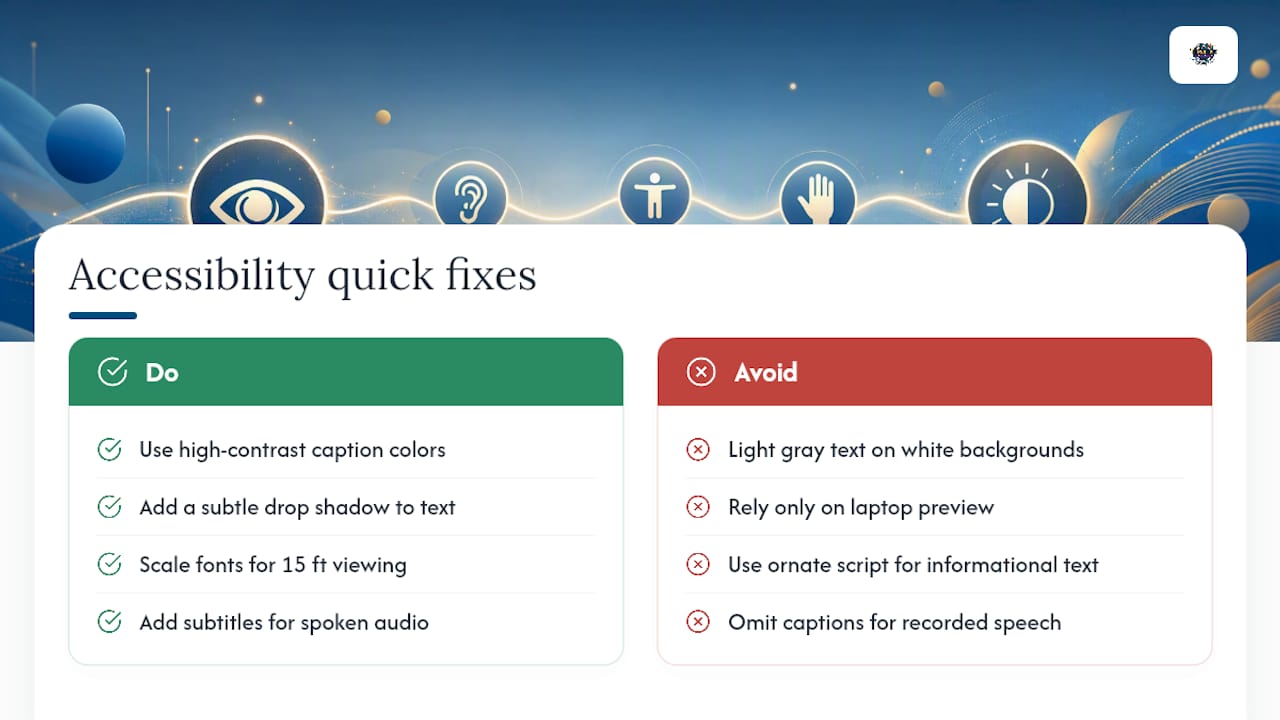
Contrast is the biggest issue. Light gray text on a white background photo might look clean on your screen, but it disappears entirely under party lighting or on an older projector. Stick to high-contrast caption colors, white or black text with a subtle drop shadow, so names and dates stay legible regardless of what’s behind them.
Font size needs to scale to the room, not your monitor. What reads fine on a 13 inch laptop can turn to a blur from across a backyard on a projected screen. If you’re not sure, size captions assuming the farthest guest is sitting 15 feet away.
If you have guests who are deaf or hard of hearing, adding simple subtitles for any spoken audio, like a recorded message or interview clip, means they don’t miss content that hearing guests catch automatically. Most desktop editors and even some phone apps include a basic caption tool for this.
Keep fonts simple. Ornate script might match your graduation theme, but it’s the first thing to become unreadable at a distance or in dim lighting. Save decorative fonts for the title screen and use a clean sans-serif for anything with real information.
What We Think Actually Matters Here
Most graduation slideshow advice online treats photo selection as the hard part. It isn’t. The hard part is playback, and almost nobody plans for it until the night before the party.
We’ve watched families spend three weeks perfecting a slideshow only to have it stutter on a borrowed TV because nobody tested the HDMI cable. That’s backwards. Spend real effort on your song choice and your photo arc, both genuinely shape how the room feels, but treat your export settings and your on-site test run with equal seriousness. A slightly-less-polished slideshow that plays flawlessly beats a beautiful one that freezes halfway through.
If you’re doing this yourself, the priority order should be: pick a meaningful song first, curate photos second, and test playback on the actual event screen third, never last. If that third step feels like more than you want to manage on top of everything else a graduation party involves, that’s precisely the gap a professional AV setup closes.
— Terriffics
Let A Local Pro Build And Run It For You
If reading through cull-your-photos-and-test-your-HDMI-cable made your eyes glaze over, you’re exactly who Terriffics built our slideshow service for. Instead of spending your last free weekend before the party wrestling with export settings, you hand us your photos and we handle the rest, custom editing, professional playback equipment, and an on-site technician who’s already solved every projector hiccup you haven’t thought of yet.
Our graduation packages typically combine custom slideshow creation with projector and screen rental, plus DJ sound and lighting if you want music and speeches handled by the same crew. Booking is simple: pick your date, tell us your photo count and any must-have songs, and we build the timeline around your party schedule, including a full test playback before guests arrive and quiet teardown after. That means guaranteed playback quality, zero cable-scrambling on party day, and a technician on-site if anything needs adjusting mid-event.
Ready to skip the editing software? Check our photobooth rental packages to bundle a slideshow with other entertainment, or reach out directly to get a quote for your graduation date on Oahu.
Sources
Recommended
Comments