
_edited.png)

Terriffics: 5 Karaoke Setup Essentials Event Hosts Must Confirm

Before you sign a karaoke rental contract, confirm five essentials: grounded power near the performance area, a clear performance footprint with room for mic stands, a professional PA with two reliable microphones plus a spare, a lyrics display everyone can see, and reliable song access through Wi‑Fi or preloaded backup. Walk through each item with your provider and your venue manager before you book, not the week of your event.
TL;DR:
Confirm that the venue provides a grounded power outlet within a reasonable distance, or arrange for high-quality extension cables.
Ensure the karaoke system includes appropriately sized powered speakers, a mixer with open channels, and at least two wireless mics with a wired backup.
Request a clear staffing plan with itemized quotes, including setup, teardown, and overtime rates, and require proof of liability insurance.
Position speakers a few feet off walls, aim them away from microphones, and place the lyrics display where both audience and performers can see it comfortably.
Build in redundancy with preloaded song libraries and backup power solutions, and request a live sound check before guests arrive.
Table of Contents
What Are the Core Karaoke Setup Requirements for a Venue?
Your venue does half the work in any karaoke setup, so nail these details before your entertainment company shows up with gear.
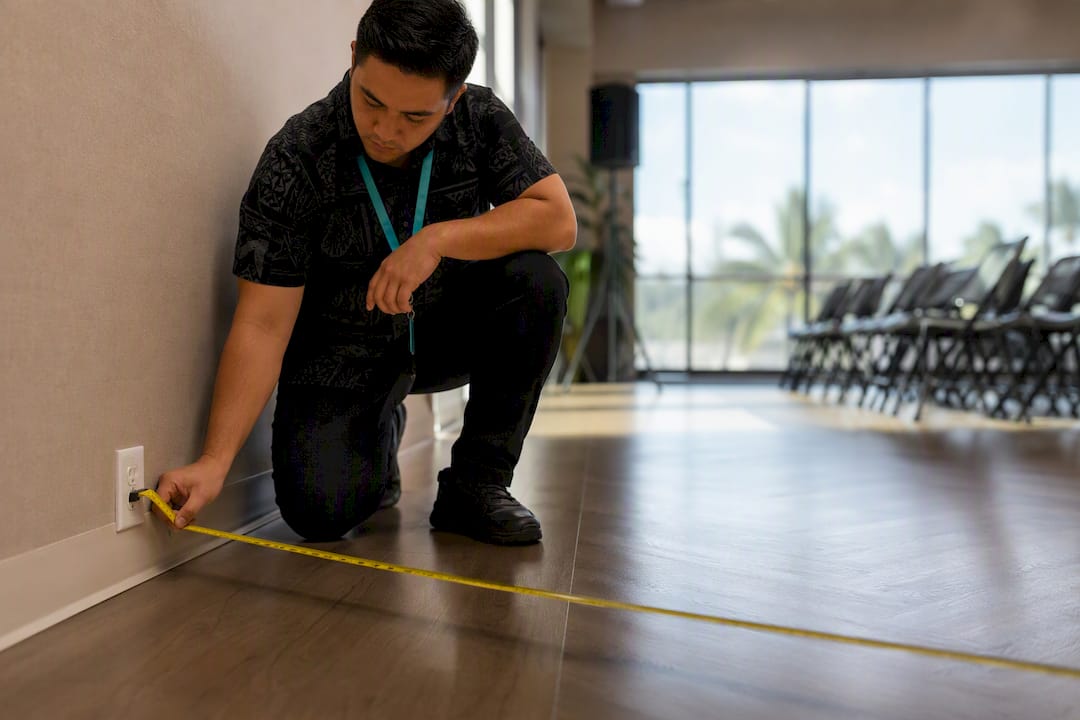
Start with power. Most professional karaoke rigs need a grounded power outlet reasonably close to the performance area. Walk the room with a tape measure (or count paces) from the nearest wall outlet to where the action happens. If the outlet is farther, ask whether the provider carries heavy-duty extension cables rated for the distance.
Space matters just as much. A small professional system needs roughly a 6x12 foot footprint, enough for a mic stand, a monitor, and walking room for performers without tripping over cables. Bigger events need proportionally more.
Before booking, confirm these venue details in writing:
Load-in path: parking proximity, elevators or stairs, and door widths that affect how fast the crew can rig
Noise curfews or neighborhood restrictions, especially for outdoor or residential settings
Overhead protection for any outdoor equipment in case of rain or wind
Required permits or venue-side insurance documentation
Whether the venue already owns a screen or PA that could simplify the equipment checklist
Add every one of these to your booking form. A missing detail here is the most common source of day-of delays.
What Equipment Do Professional Karaoke Rentals Include?
A rental team should walk you through exactly what they’re bringing, and you should know enough to ask smart questions when they do.
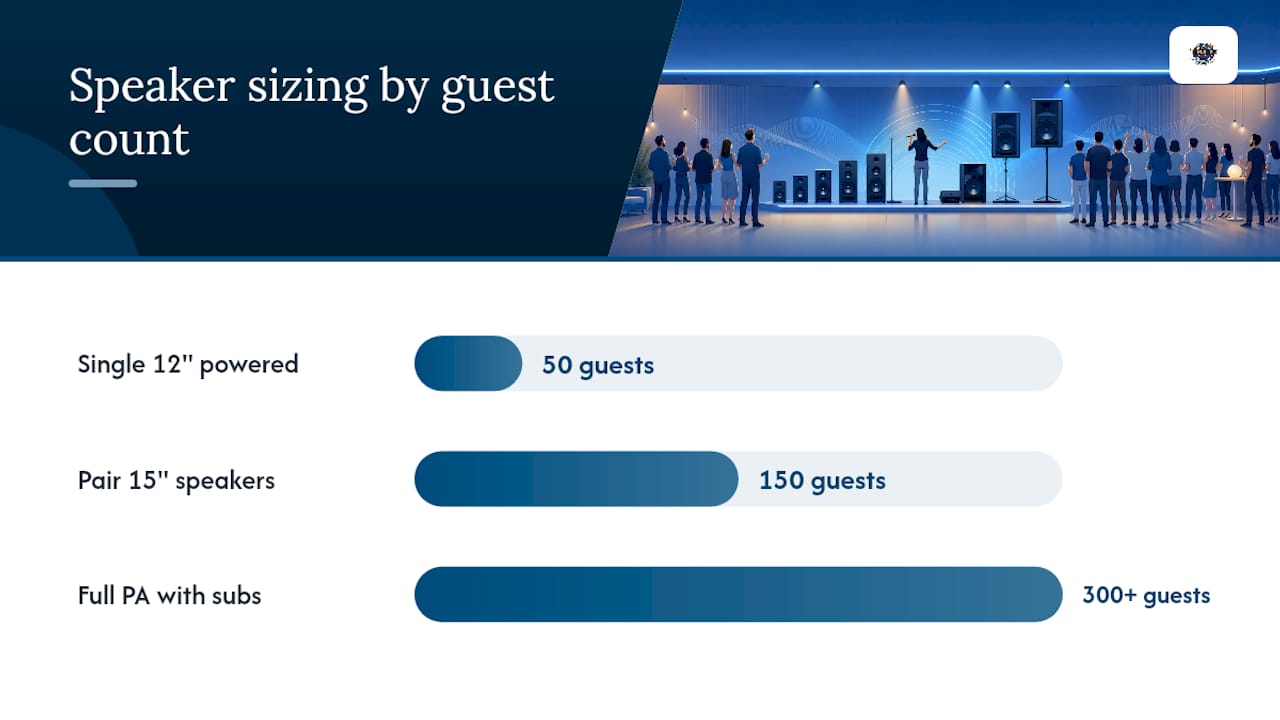
For audio, powered speakers are standard for most private events; a passive speaker plus separate amp shows up more often at larger productions. A single 12-inch powered speaker handles an intimate gathering of 50 guests. Plan for a pair of 15 inch speakers at 150 guests, and a full PA with subwoofers for 300 or more. The mixer or audio interface should have spare inputs open, since most hosts eventually want to plug in a laptop for background music or a DJ transition.
Microphones deserve special attention. The standard, battle-tested setup is two wireless handheld mics plus one wired spare. Wireless mics fail (dead batteries, dropped signal, a guest who drops one in a pool) more often than people expect, and capsule durability separates a mic that survives a wedding season from one that dies after three uses.
Here’s the full rundown of what to confirm:
PA system sized to your guest count, with headroom for a full room
Mixer with open channels for house music or a DJ handoff
Two wireless mics plus a wired backup, tested before doors open
Performer monitor so singers can hear themselves over the crowd
Lyrics display: a 55-inch TV minimum for wide rooms, or a projector with enough lumens to fight ambient light
Control device: an operator-run station keeps the queue organized far better than a passed-around guest tablet
Pro Tip: Ask specifically whether the mics are wireless handheld with a wired spare included. Providers who hesitate on this question usually haven’t planned for the mic that inevitably dies mid party.
What Staffing and Contract Terms Should You Expect?
Setup typically takes one to two hours, and teardown usually runs 30 to 60 minutes, so build a buffer into your venue booking rather than assuming the crew arrives exactly when the party starts.
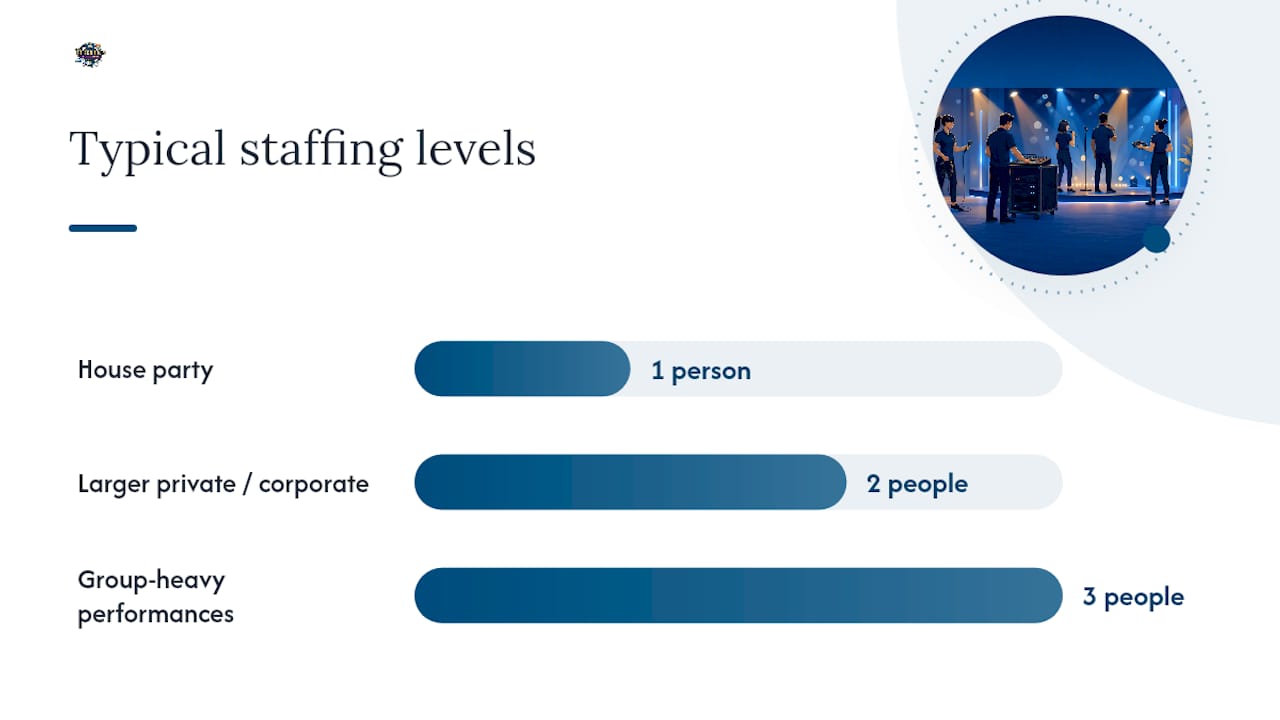
Staffing scales with your event. A house party might need just one operator who also hosts. Larger private events and any corporate function should have an operator plus a dedicated audio technician, and group-heavy performances benefit from a floor assistant who manages the singer queue near the stage.
On the paperwork side, expect and request:
An itemized quote covering the base kit, travel, setup and teardown hours, and staffing separately
A nonrefundable retainer, commonly 20 to 50 percent of the total, due at booking
A contract clause spelling out exact hours, the overtime rate if your party runs long, and who’s liable for equipment damage
Proof of public liability insurance from the provider, especially for corporate or venue-required bookings
Clarity on who handles music licensing if your venue requires proof of it
Nail these down in writing and you eliminate almost every dispute that shows up after the party ends.
How Should Speakers and Screens Be Positioned in the Room?
Placement decides whether your karaoke sounds crisp or turns into a squeal of feedback the moment someone grabs the mic.
Speakers should sit a few feet off the walls; jamming them into a corner amplifies bass into a boom mess. Angle them toward the audience, not toward the microphone position, since that angle is exactly what causes feedback loops in the first place.
A few layout notes worth requesting from your provider:
Position the lyrics screen where both the audience and the performer can see it without turning their back to the crowd
For upscale or corporate karaoke setups, request a dual-screen configuration with a stage-facing monitor so performers don’t lose their spot on stage
Rugs, curtains, or other soft furnishings absorb sound and reduce echo in hard-surfaced rooms like ballrooms or gyms
Ask for a stage monitor or wedge if you’re expecting group performances, so multiple singers can hear the mix clearly
Pro Tip: A good provider tests the full sound chain with a live mic and two staff members before guests arrive, one singing, one listening from the back of the room. If your provider skips this step, ask them to add it.
What Backup Systems Keep Karaoke Running If Wi-Fi Fails?
Cloud-based karaoke platforms need a strong Wi‑Fi connection, and the signal at your venue’s front desk means nothing if the performance area is in a back room or on a deck. Operators test the exact setup spot, not just the general building, and you should ask your provider to do the same during a walkthrough.
Build in redundancy on both the connectivity and power side:
Preloaded tablets or a local song library keep the show running if Wi‑Fi drops mid-event
A small UPS on the control device prevents a crash during a brief power blip, rather than losing the entire song queue
Surge protectors and properly rated extension runs protect the gear from a venue’s older electrical circuits
A provider should arrive with spare mics, spare cables, and a backup hotspot device as standard kit, not an upcharge
What Drives Karaoke Rental Costs Up or Down?
A karaoke quote is built from several line items, and understanding each one helps you spot where your money actually goes: the base equipment kit, a travel fee tied to distance, setup and teardown hours, staffing, any overtime, and insurance coverage.
Certain requests reliably raise the price. Long equipment carries, stairs instead of an elevator, multi-room setups, extra performer monitors, and extended hours beyond the standard package all add cost, sometimes significantly.
For a rough sense of scale: a small private party with basic PA, two mics, and a single screen sits at the lower end of most providers’ pricing. A mid-size corporate event with a dual-screen setup, dedicated audio tech, and extended hours lands considerably higher once staffing and overtime enter the picture.
Two things protect you from surprise charges:
Always request a fully itemized quote, not a single flat number
Confirm the overtime rate in writing before the event, not verbally on the day
Notes From Terriffics on Booking Karaoke the Right Way
We’ve set up karaoke systems across venues on Oahu ranging from backyard birthday parties to full corporate productions, and the pattern holds every time: the setups that go smoothly are the ones where the host confirmed the details early. Our karaoke rental page outlines what we bring to every booking, and posts like Two Mics Plus a Spare walk through the exact feedback issues we watch for during setup.
A good booking checklist always starts with three questions: what’s the load-in route, where’s the nearest grounded outlet, and who’s the onsite contact if something needs adjusting mid-event? If you want visual examples of how a stage or dual-screen setup actually looks in a real room, our case posts on corporate karaoke setups are worth a scroll before you finalize your own layout.
— Terriffics
Book Your Karaoke Setup With Terriffics Entertainment
Terriffics Entertainment handles the full checklist above so you don’t have to chase down power specs or chase spare mics the week of your event. Our karaoke rental service includes the full kit, an on-site operator, setup and teardown, and proof of insurance ready for any venue that asks.
If you’re already booking a DJ, ask how to add karaoke to your DJ package instead of hiring two separate vendors, it usually simplifies your contract and your load-in schedule at the same time. Reach out for a quote and we’ll respond with availability and pricing quickly, then walk through your venue’s power, space, and access details together so nothing gets left out of the booking form. If you’re also considering a DJ for the same event, our DJ rental page covers what a combined package looks like. Check your date and get a quote before your preferred weekend books up.
Sources
FAQ
How Far in Advance Should I Book Karaoke for My Event?
Book six to eight weeks ahead for weddings and corporate events, and at least two to three weeks ahead for smaller private parties, since popular dates fill up fast on Oahu.
Who Handles Music Licensing for a Karaoke Event?
Licensing responsibility varies by venue and provider, so confirm in writing whether your karaoke company covers it or whether the venue requires its own proof of licensing.
What Happens if the Wi-Fi Fails During the Event?
A professional setup should include offline backups like a preloaded tablet or local song library, so the show continues even if the internet connection drops.
How Many Microphones Do I Actually Need?
Two wireless handheld mics plus one wired spare covers nearly every event size, from an intimate party to a full corporate karaoke setup with group performances.
What Screen Size Works Best for Lyrics Display?
A 55 inch TV is the practical minimum for a mid-size room, while larger venues or outdoor setups often need a projector with enough lumens to overcome ambient light.
Recommended
This article was created with the assistance of AI and reviewed for relevance and accuracy by Terriffics Entertainment. Information may change over time, so readers should verify important details with the appropriate local source.
Comments