
_edited.png)

10–15 Photos per Minute: Slideshow Pace for Planners and Families

Aim for 4 to 6 seconds per photo for most event slideshows, which works out to about 10 to 15 photos per minute. At 5 seconds per photo, that’s roughly 12 photos per minute. Speed up to 2 to 3 seconds per photo for upbeat action montages, and slow down to 7 or 8 seconds for memorial tributes or portrait-heavy sections where you want guests to actually look.
TL;DR:
Using a buffer of 10% in photo count calculations prevents running out of photos due to transition overlaps, especially for longer shows.
Pacing should vary according to the event’s mood, with 2 to 3 seconds per photo for energetic segments and 7 to 8 seconds for emotional or portrait-heavy moments.
For most events, a total slideshow length of 5 to 8 minutes, with 60 to 96 photos at 5 seconds per photo, is a standard guideline.
Effective planning includes thorough rehearsals, backup files, and confirming technical details with the venue and DJ to ensure seamless playback.
Custom slideshow services can handle pacing, transitions, and synchronization, reducing stress and technical issues during the event.
Table of Contents
How to Calculate Photos Per Minute for Your Slideshow
Here’s the formula you’ll actually use: photos needed = (minutes × 60) ÷ seconds per photo, and photos per minute = 60 ÷ seconds per photo. Once you know your target length and pace, the math takes about ten seconds.
Let’s run a few real scenarios you might be planning right now:
5 minutes at 4 seconds/photo: (5 × 60) ÷ 4 = 75 photos
8 minutes at 5 seconds/photo: (8 × 60) ÷ 5 = 96 photos
3-minute social reel at 2 seconds/photo: (3 × 60) ÷ 2 = 90 photos
Notice how the fast-paced 3-minute reel needs almost as many photos as the slower 8-minute version. Pace changes your photo count just as much as length does.
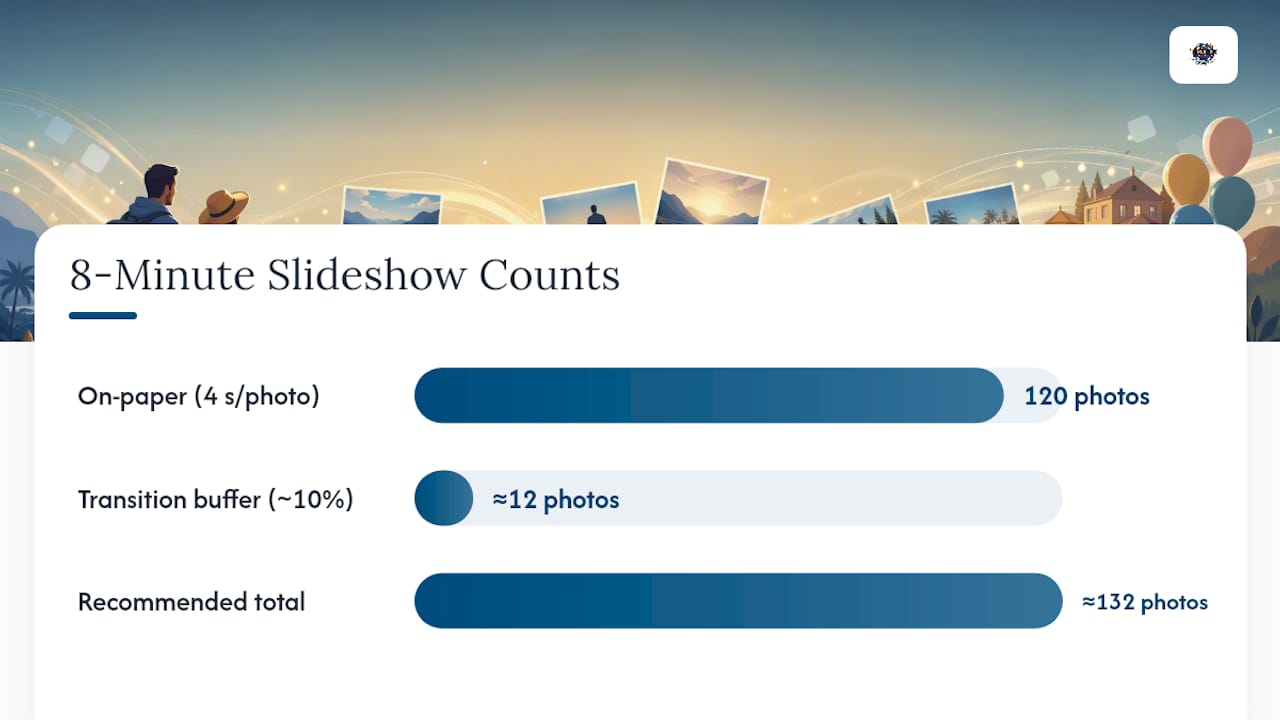
One detail trips up a lot of first-time slideshow builders: transitions eat into your display time. A free slideshow photo count calculator recommends building in roughly a 10% buffer, so an 8-minute show at 4 seconds per photo (120 photos on paper) should really land closer to 130 to 132 photos once you account for crossfades and editing flexibility. Build that cushion in early. Nothing derails a rehearsal faster than realizing you have only 15 photos the night before the event.
Which Pace Fits Which Celebration?
Pacing isn’t just math. It’s mood. A safe default is 4 to 6 seconds per photo for the bulk of any event slideshow, but the occasion should shift where you land inside that range, and sometimes outside it entirely.
Three bands to work with:
Fast (2 to 3 seconds): energetic, best for candid shots, group photos, or building excitement during a grand entrance.
Normal (4 to 6 seconds): the workhorse pace for most milestone celebrations, giving guests enough time to recognize faces without dragging.
Slow (7 to 8 seconds): reserved for portraits, tributes, or any photo carrying real emotional weight.
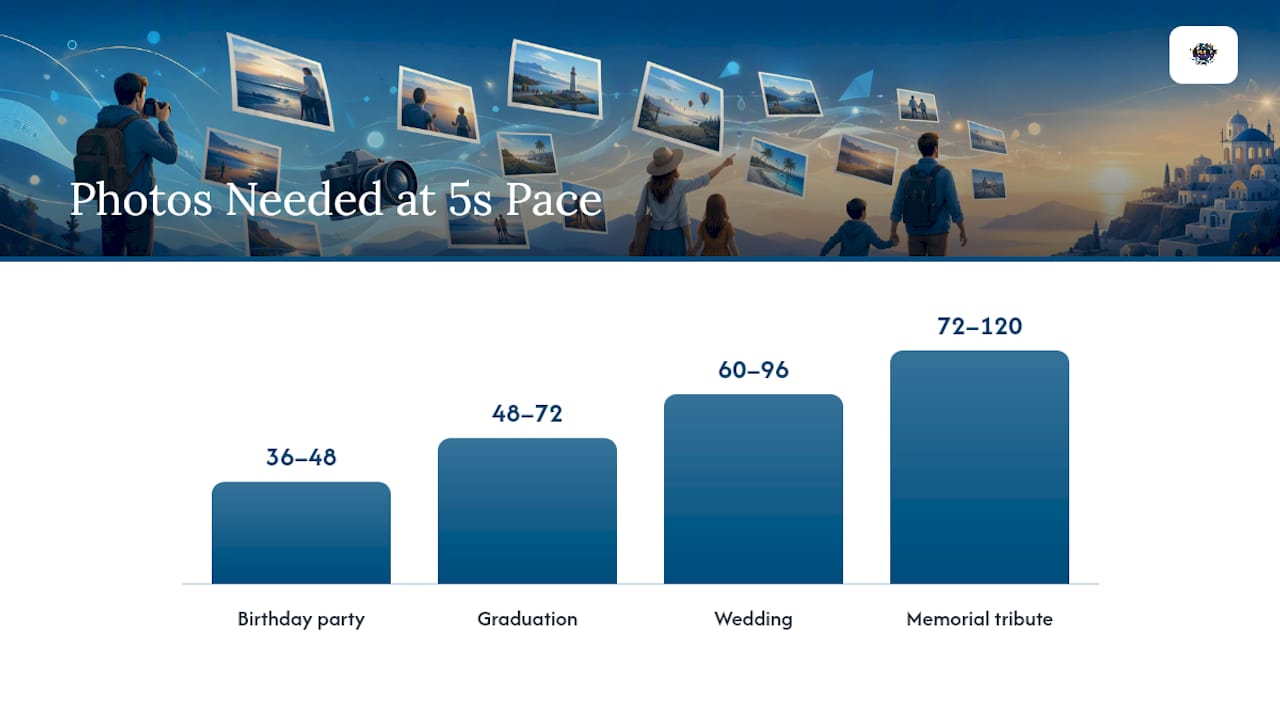
Most slideshows run best between 3 and 10 minutes, and weddings commonly land at 5 to 8 minutes total. Here’s how that breaks down at a 5-second default pace:
Occasion | Typical length | Photos needed (5s/photo) |
Birthday party | 3 to 4 minutes | 36 to 48 photos |
Graduation | 4 to 6 minutes | 48 to 72 photos |
Wedding | 5 to 8 minutes | 60 to 96 photos |
Memorial tribute | 6 to 10 minutes | 72 to 120 photos |
You don’t have to lock in one pace for the whole show. Plenty of the slideshows we build for Oahu families mix tempos deliberately, opening with a fast run of candid childhood shots, easing into a normal pace for family portraits, then slowing way down for the final tribute photo before the lights come up.
Pro Tip: If you’re planning a graduation slideshow, work backward from your exact photo count instead of guessing a length. Our graduation slideshow length formula walks through the exact math for 2 to 5 minute shows.
Building the Slideshow: From Selection to Export
Once you know your target pace and photo count, the actual build follows a predictable sequence.
Cull ruthlessly. Pick photos for variety, not just quality. You want different subjects, locations, and emotional beats, not twelve nearly identical shots of the same smile. Aim for your calculated count plus that 5 to 10% buffer.
Choose an ordering strategy. Chronological order works for a life story or wedding day timeline. Thematic blocks (family, friends, milestones) work better for birthdays. Either way, save one or two surprise photos for the middle. That’s where attention tends to dip.
Account for transitions in your timing. A crossfade or wipe typically overlaps with the photo before and after it, which quietly shortens the time each image is fully visible. If you’re using display and transition duration sliders in your editing software, check both numbers, not just the display time.
Match your pace to the music’s tempo. Some slideshow tools estimate seconds per photo using the song’s BPM band, roughly 70 to 85 BPM for slow ballads and 115 to 130 BPM for upbeat tracks. A slower ballad calls for a slower photo pace, or the images will feel like they’re racing past the music.
Export smart. Save as MP4 with embedded audio, choose 1080p or 4K depending on your screen size, and keep an eye on file size so it doesn’t choke on playback. Always bring a backup copy on a second drive or USB.
Getting the Slideshow Right on Event Day
A slideshow that looks perfect on your laptop can stumble the moment it hits a projector at a wedding reception. Reliability on the day matters as much as the pacing math.
A few habits we build into every event:
Bring redundancy. Primary file on the main device, a spare on a USB drive, and a cloud link as backup. If a laptop crashes mid reception, you don’t want the slideshow to die with it.
Cue with the DJ, not around them. Give your DJ the exact run time and use intro or outro holds so the music and slides land together instead of racing to a mismatched finish.
Check the room, not just the file. Confirm resolution and aspect ratio for the screen, gauge ambient light for projector visibility, and test sound levels before guests arrive.
Schedule a real run-through. Even a five-minute test catches sync issues that a screen preview never will.
Some platforms include automated beat-match modes that shift slide durations to fit the music automatically, which can save time if you’re short on prep hours. For song selection that actually pairs well with wedding slideshows, timing the emotional peaks to the music makes a bigger difference than most people expect. Our gallery has examples of how this plays out at real Oahu events, from projector setups to synced DJ cues.
Quick Reference: Photo Counts by Length and Pace
Keep this chart handy when you’re collecting photos for an upcoming event.
Slideshow length | 3 sec/photo | 5 sec/photo | 6 sec/photo |
3 minutes | 60 photos | 36 photos | 30 photos |
5 minutes | 100 photos | 60 photos | 50 photos |
8 minutes | 160 photos | 96 photos | 80 photos |
Before your event, run through this short list:
Two backup copies of the final file, stored separately.
Photos named or numbered in playback order.
AV or DJ contact confirmed with the exact run time.
A scheduled run-through, not just a screen preview.
Your 5 to 10% transition buffer already built into the photo count.
How We Think About Pacing at Island Events
Every venue on Oahu has its own rhythm, and a slideshow that nails the pacing at a beachfront reception can feel rushed at an indoor banquet hall with a live band. We build the default pace first, then rehearse it once with the DJ and the room before guests arrive. Pick your pace, test it in the actual space, and adjust once. That single rehearsal solves more problems than another hour of tweaking seconds per photo.
— Terriffics
Let Terriffics Handle the Pacing for You
Terriffics Entertainment is the alternative to piecing together your own slideshow software and hoping the DJ syncs it right. We build the pacing, the transitions, and the playback so your family or event team never has to touch a timeline chart on the day of the celebration.
Our Event Slideshow Service pairs directly with our DJ rental service, so your slides and music hit their marks together instead of drifting apart mid reception. If you’re already planning a photo booth for the event, images from our AI-powered photobooth can feed straight into the same slideshow, giving you fresh content the same night. Current pricing for all packages is listed on our services page. Reach out today to check availability for your date and get a quote for a custom slideshow, synced and ready to play the moment your guests sit down.
Sources
FAQ
How Many Photos Per Minute Should a Slideshow Have?
At the standard 4 to 6 second pace, that works out to roughly 10 to 15 photos per minute, with 12 photos per minute being a common default at 5 seconds per photo. Faster montages can run faster, while slow tribute sections may drop to 7 or 8 photos per minute.
How Do I Calculate the Right Photo Count for My Slideshow?
Multiply your slideshow length in minutes by 60, then divide by your chosen seconds per photo. An 8-minute slideshow at 5 seconds per photo needs 96 photos, plus a 10% buffer for transitions.
What’s the Ideal Slideshow Length for a Wedding?
Weddings commonly run 5 to 8 minutes, which typically needs 60 to 96 photos at a 5-second pace. Shorter shows suit cocktail hour loops, while longer ones work better as a reception centerpiece.
Does Terriffics Entertainment Build Custom Slideshows for Oahu Events?
Yes, Terriffics Entertainment offers an Event Slideshow Service that handles pacing, transitions, and DJ synchronization for weddings, graduations, and birthdays across Oahu. Pricing details are available directly on the services page.
Should I Use the Same Pace for the Entire Slideshow?
No, mixing paces inside one slideshow often works better than a single fixed speed. Fast sequences suit candid or action shots, while slower pacing at 7 to 8 seconds per photo fits portraits or memorial tributes where guests need more time to react.
Recommended
This article was created with the assistance of AI and reviewed for relevance and accuracy by Terriffics Entertainment. Information may change over time, so readers should verify important details with the appropriate local source.
Comments